Product demonstration

Watch StoreStreamer AI optimise a product.

StoreStreamer AI is a Shopify app that reads the products already in your catalogue and improves how they are written and found — product descriptions, SEO titles, meta descriptions, image ALT text and links to related products and collections — across the whole catalogue rather than one product at a time.

The demonstration below replays one optimisation run for a fictional outdoor retailer and shows what that run did to a single product. It starts on its own and repeats.

This is a simulation. No Shopify store is connected, no products are read or written, no optimisation runs and no credits are used. The application wording, log output and run summary follow the real app; the store, the product and its image are fictional.

What StoreStreamer does

One run, applied across your catalogue

StoreStreamer AI works inside Shopify admin. You configure how it writes, choose which products or collections are in scope, confirm the run, and StoreStreamer writes the results back to your store. The walkthroughs below use the real application screens for settings, Product Scope and Confirm, then the optimisation console.

  • Product descriptions
  • Collection descriptions
  • SEO page titles
  • Meta descriptions
  • Image ALT text
  • Internal links to related products and collections
  • Thousands of products in one background run
  • Catalogue content in multiple languages

This demonstration uses product descriptions, SEO titles and meta descriptions, image ALT text and internal linking together. Each of those content types can be switched on or off in Optimisation Settings.

Configuration

Configure how StoreStreamer works

Choose the writing style, language, creativity and brand guidance that suit your store, then decide which types of content StoreStreamer should optimise. The animation below uses the real Store AI Settings and Optimisation Settings screens.

Opening Store AI Settings for Northmoor Outdoor Supply.

Preview before you optimise

You can preview your AI settings against a real product in your store before running a catalogue optimisation. This lets you adjust the settings and check that they produce the type of content you want. The preview does not change your product information.

Preparation

Choose the products, then confirm the run

Before StoreStreamer writes anything, a merchant sets Product Scope and reviews Confirm Product Optimisation. The animation below uses those real screens for Northmoor Outdoor Supply: three outdoor collections, new products only, then Confirm & Run.

The cursor is selecting Product Scope for this run.

Live demonstration

An optimisation run, as it happens

Northmoor Outdoor Supply is a fictional retailer with a Sports & Outdoors store profile. After Confirm & Run, StoreStreamer refreshes what it understands about the catalogue, then works through the twelve new products in the three selected collections. Image ALT text is set to the first five images of each product. The console below keeps looping so you can watch the run again.

In the StoreStreamer app

Product Optimisation

Running

Processing products...

⏱ Elapsed: 0m 00s

Product Optimisation

Live

⏱ Elapsed: 0m 00s

This is the run summary and the processing log StoreStreamer shows on the dashboard. A run continues in the background if the merchant closes the browser, and the log and finished summary are waiting when they come back.

Product transformation

What happened to this product?

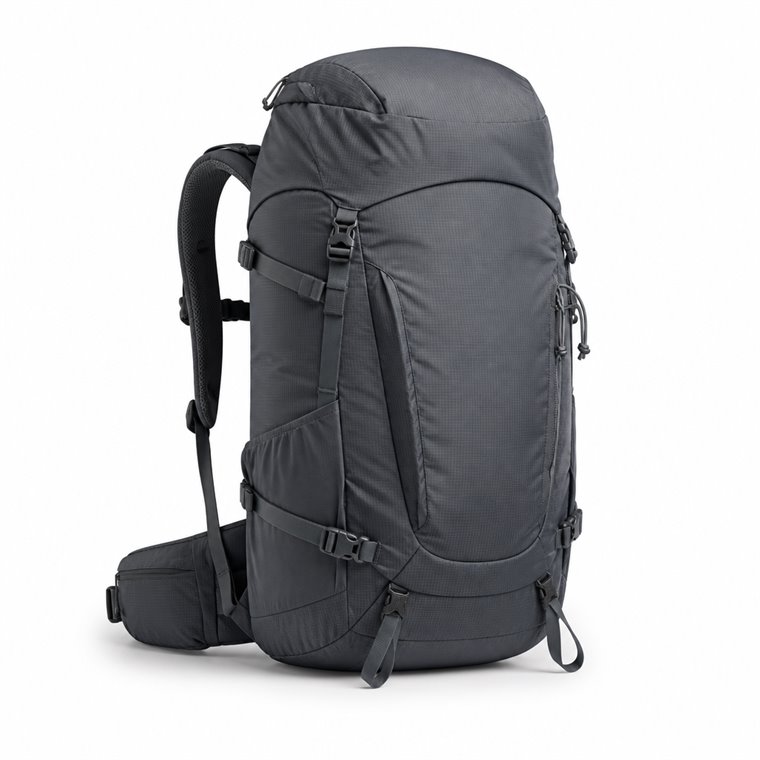
One of the twelve products in the run is a 35-litre trekking backpack. Before this run it had little written content — a short supplier note, no SEO fields, no image ALT text and no links to anything else in the range. StoreStreamer can improve an existing description or create one when there isn’t much to start with, using the product information available. This is what the run changed.

Fellwalker 35L trekking backpack in slate, front view
Fellwalker 35L Trekking Backpack
/products/fellwalker-35l-trekking-backpack

A fictional product used for this demonstration. On the left is the limited content available before the run; on the right is what StoreStreamer wrote from that product information.

Before — available product information
Product description

35L trekking backpack. Ripstop nylon body. Hydration bladder compatible. Integrated rain cover. Adjustable back system. Weight 1.24kg. Colour: Slate.

After — StoreStreamer AI Updated in this run
Product description

Thirty-five litres of carrying space for a full day on the hill, in a ripstop nylon pack that keeps its own weight down to 1.24kg.

The back system adjusts to suit your torso, and the pack takes a hydration bladder if you would rather drink on the move. A rain cover is integrated for when the weather turns.

Product Details:

  • Capacity: 35 litres
  • Body fabric: Ripstop nylon
  • Weight: 1.24kg
  • Back system: Adjustable
  • Hydration: Bladder compatible
  • Rain cover: Integrated
  • Colour: Slate

How the product appears in search results

Shopify stores the SEO page title and meta description separately from the description a customer reads. This product had neither. StoreStreamer wrote both from the same product information, within the length search engines usually display.

Before
SEO page title
Not set
Meta description
Not set
After
SEO page title
Fellwalker 35L Trekking Backpack | Ripstop, 1.24kg 50 characters — StoreStreamer keeps SEO titles within 60.
Meta description
A 35-litre ripstop nylon trekking backpack weighing 1.24kg, with an adjustable back system, hydration bladder compatibility and an integrated rain cover. 153 characters — StoreStreamer writes meta descriptions at 150–155.

Image ALT text

ALT text describes an image for customers using a screen reader, and for search engines that cannot see the picture. Supplier images usually arrive with none at all — just a camera filename.

Fellwalker 35L trekking backpack in slate, front view
Before — image 1 of 5
No ALT text File name: IMG_4471.jpg
After — image 1 of 5
Fellwalker 35L trekking backpack in slate, front view First 5 Images means StoreStreamer processes the first five images of each product. Each image is described individually, so every image gets its own ALT text based on what that image shows.

Links to the rest of the range

A customer reading about this backpack may want the bigger version, or the rest of the collection. While it writes the description, StoreStreamer can add links to a related collection and a related product from your own catalogue, so those routes are there without anyone adding them by hand. This is the sentence it added to the description above:

Internal linking is one of the content types you can switch off in Optimisation Settings if you would rather manage links yourself.

How it works

What the run did, and what you control

StoreStreamer AI is built for merchants who cannot afford surprise edits on revenue pages. The run you have just watched follows the same rules on a catalogue of twelve products or twelve thousand.

  • It works with the product information you already have

    StoreStreamer uses the information available for each product to create or improve its content. If a product already has a description, StoreStreamer can improve it while retaining the useful information it contains. If there is little or no description, it can build one from the other product information available.

  • Length follows the evidence

    Description length is a writing-style target, not a word quota. A product with a few solid specifications gets a short, confident description rather than padding invented to reach a target length.

  • You choose what is in scope

    Target collections, tags or vendors, and choose whether a run covers new products only or everything in scope. Products outside the run are untouched, and StoreStreamer never changes titles, prices, images or inventory.

  • You confirm before anything is written

    Before a run starts, the app shows how many products are in scope and the estimated credit usage. You can also preview how your writing settings read on a single product before committing to a catalogue-wide run.

  • Long runs continue in the background

    A run keeps going after you close the browser. Come back later and the dashboard shows the processing log and the finished summary. A run in progress can be cancelled, and work already completed is kept.

  • A run can be reversed

    StoreStreamer takes a snapshot of the content it is about to change. Undo last optimisation returns everything the most recent run touched to that snapshot, and Restore original content goes further back, to the content those products had before StoreStreamer first changed them.

Run this on your own catalogue

Install StoreStreamer AI from the Shopify App Store, choose the collections you want to work on, and confirm the run. New installs receive a one-time allocation of 25 introductory credits — one credit optimises one product — before you subscribe.